---
title: "Flutter seat map"
description: "Install the official SeatLayer Flutter seating-chart package, render live inventory, create holds, and hand booking to a trusted server."
---
The official SeatLayer Flutter seat map SDK adds an interactive seating chart
and seat picker to reserved-seating applications on iOS and Android. The
[`seatlayer` package on pub.dev](https://pub.dev/packages/seatlayer) provides a
typed Flutter view, controller, commands, errors, and event streams for live
availability, seat selection, temporary holds, and best-available seating.
[Inspect the Flutter source and runnable example](https://github.com/seatlayer/seatlayer-flutter),
learn about the [SeatLayer reserved-seating platform](https://seatlayer.io/), or
preview the wider buyer experience in the
[browser seat-map demo](https://app.seatlayer.io/demo/play/grand-theatre). The
browser demo is product proof, not a Flutter application.
## Install the Flutter package
Add the current production SDK:
```bash
flutter pub add seatlayer
```
Or pin the release in `pubspec.yaml`:
```yaml
dependencies:
seatlayer: ^0.2.1
```
The package supports Flutter applications on iOS and Android. It does not
currently claim Flutter web, macOS, Windows, or Linux support.
## Render a seating chart
Create one controller for the lifetime of the view, give the map a definite
height, and dispose the controller with the host state:
```dart title="seat_map_screen.dart"
import 'package:flutter/material.dart';
import 'package:seatlayer/seatlayer.dart';
class SeatMapScreen extends StatefulWidget {
const SeatMapScreen({super.key});
@override
State createState() => _SeatMapScreenState();
}
class _SeatMapScreenState extends State {
final controller = SeatLayerController();
@override
void dispose() {
controller.dispose();
super.dispose();
}
@override
Widget build(BuildContext context) {
return SizedBox(
height: 640,
child: SeatLayerView(
controller: controller,
configuration: SeatLayerConfiguration(
event: 'ev_your_event_key',
currency: 'USD',
),
onReady: (info) {
debugPrint('SeatLayer ready: ' + info.mode.raw);
},
),
);
}
}
```
Do not nest `SeatLayerView` inside `ListView`, `SingleChildScrollView`, or
another gesture-driven zoom surface. The buyer canvas owns pan and pinch
gestures. Use a fixed-height `SizedBox`, an `Expanded` child with a resolved
height, or a full-screen route.
## See the shipped Flutter example
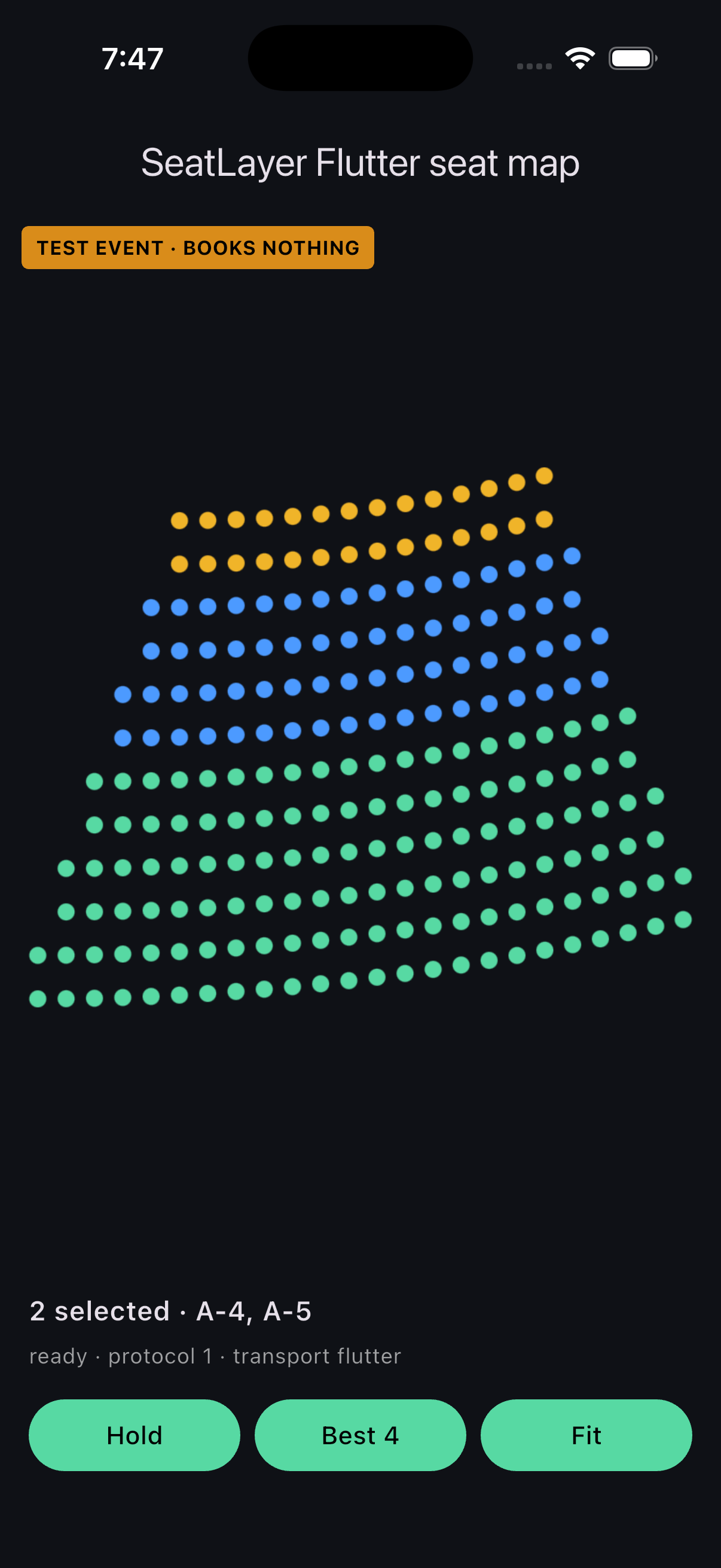
The repository example running the packaged Flutter bridge and buyer
renderer in the iOS Simulator.
The [runnable Flutter example](https://github.com/seatlayer/seatlayer-flutter/tree/main/example)
uses a packaged offline fixture, so you can verify rendering, selection, holds,
best-available commands, and event delivery without a live event key.
```bash
git clone https://github.com/seatlayer/seatlayer-flutter.git
cd seatlayer-flutter/example
flutter pub get
flutter run
```
The fixture does not simulate live inventory or production checkout. Connect a
SeatLayer test event and your backend when validating expiry, contention,
access, payment, and booking.
## Understand the hosted runtime boundary
`SeatLayerView` is a Flutter widget backed by `webview_flutter`. Production
views load the immutable `seatlayer-js@0.67.14/mobile.html` runtime from
`https://cdn.seatlayer.io`; the packaged test fixture is pinned to the same
verified release. Your application code stays in Dart and communicates through
typed commands, event streams, payloads, and structured errors.
This boundary gives iOS and Android one canonical HTTPS origin for
origin-restricted buyer sessions. Access tokens stay in memory and are never
placed in page URLs or emitted as application events.
For private channel inventory, provide a short-lived token from your backend:
```dart
final configuration = SeatLayerConfiguration(
event: 'ev_private',
buyerAccessTokenProvider: (context) =>
buyerBackend.mintSeatLayerAccess(context.reason),
);
```
## Select, hold, and hand off checkout
Buyer actions run through the controller:
```dart
try {
final result = await controller.bestAvailable(4);
if (result != null) {
beginCheckoutOnYourServer(result.holdId);
}
} on SeatLayerError catch (error) {
showRecoverableSeatError(error.code, error.message);
}
```
Keep the security boundary explicit:
- The Flutter app selects seats and creates a temporary hold.
- Your backend inspects the hold and derives the amount to charge.
- Your payment and order workflow stays outside the WebView.
- Your backend books with a stable `bookingRef` so retries are safe.
- Expiry and inventory conflicts return buyers to a recoverable selection
state.
Continue with [holds and checkout](/buyer-sdk/holds-and-checkout) before
connecting a production order flow.
## Commands and event streams
Common commands include `hold`, `resumeHold`, `extendHold`, `release`,
`bestAvailable`, `getSelection`, `selectObjects`, `clearSelection`,
`getCurrentHold`, `setFloor`, `setViewMode`, `getViewMode`, `zoomIn`,
`zoomOut`, `zoomToFit`, and `destroy`.
Typed streams include `onReady`, `onSelectionChanged`, `onHold`,
`onHoldRestored`, `onHoldExpired`, `onBuyerAccessExpired`,
`onSelectedObjectsUnavailable`, `onError`, and `onUnknownEvent`. Unknown future
enum values and events remain forward-compatible instead of crashing an older
application.
## Flutter seat-map checklist
- Give the seat map a definite height or a full-screen route.
- Keep one controller for one view lifecycle and dispose it with the screen.
- Preserve the hold id across checkout navigation or app suspension if your
product promises restoration.
- Test rotation, safe areas, keyboards, back navigation, suspension, and resume.
- Verify selection, hold, expiry, release, conflict, and booking with a test
event.
- Smoke-test supported physical iOS and Android devices before rollout.
## Frequently asked questions
### Is SeatLayer a Flutter widget or a WebView snippet?
`SeatLayerView` is a Flutter widget with a typed Dart controller. Internally it
uses `webview_flutter` to load SeatLayer's immutable mobile runtime; your app
uses Dart commands and event streams rather than an untyped JavaScript snippet.
### Which Flutter platforms are supported?
iOS and Android are supported. The package does not currently advertise
Flutter web or desktop support.
### Can I evaluate the seat picker without a live event?
Yes. Run the repository example to exercise the view, bridge, renderer,
selection, holds, and best-available behavior against the offline fixture. Use
a test event for live availability, expiry, access, conflict, and checkout
validation.
### Does the Flutter application book seats or process payment?
No. It selects inventory and creates a temporary hold. Your trusted backend
inspects the hold, processes the order, and books the seats.
### Why does the seating chart require a definite height?
The canvas needs a resolved viewport and owns pan and pinch gestures. A
full-screen route or fixed-height container prevents gesture and layout
conflicts.
### Is the browser buyer demo a live Flutter demo?
No. It demonstrates the wider SeatLayer buyer journey in a browser. The
repository example and iOS Simulator capture above are the Flutter-specific
proof.
### Does the Flutter SDK include a 3D seating chart?
SeatLayer offers an [optional browser 3D seat-map experience](https://seatlayer.io/3d-seat-map/).
This page does not claim a released native Flutter 3D contract; validate the
documented Flutter modes and device support for your integration.
## Next steps
- [Install SeatLayer for Flutter on pub.dev](https://pub.dev/packages/seatlayer)
- [Run or inspect the Flutter SDK source](https://github.com/seatlayer/seatlayer-flutter)
- [Understand the SeatLayer platform](https://seatlayer.io/)
- [Preview the buyer seat map in a browser](https://app.seatlayer.io/demo/play/grand-theatre)
- [Compare every mobile SDK](/buyer-sdk/mobile)
- [Connect holds to secure checkout](/buyer-sdk/holds-and-checkout)