---
title: "Organizer guide: integrate private sales"
description: "As an organizer or platform developer, allocate one Event to private audiences, authorize buyers, hold and book seats, and retain channel attribution."
---
This guide covers one event sold to more than one audience: a promoter with a
public on-sale and a travel agency selling a reserved allocation of the same
seats.
By the end you will have allocated inventory to a
[sales channel](/platform/sales-channels), minted buyer access from your
backend, held seats in the agency's own page, booked them with your own
credential, and received a webhook that says which channel made the sale.
## The shape of it
One event, `ev_9f3a`, with 1,000 seats:
- 800 on Public sale;
- 200 assigned to `Travel Agency A`.
Both audiences load the same event and the same chart. Selling `A-12` through
the agency makes `A-12` booked on the public page too, immediately, because
there is only one inventory.
The public page does **not** call the buyer-access API: it mounts the SDK with
`event` and `publicKey`. The following token flow exists only for the agency's
private allocation (and equally applies to login, presale, invite-only, and
partner audiences).
## 1. Create the channel
```bash
curl -s -X POST "https://api.seatlayer.io/v1/events/ev_9f3a/channels" \
-H "authorization: Bearer $SEATLAYER_SECRET_KEY" \
-H "content-type: application/json" \
-d '{"name": "Travel Agency A", "externalRef": "travel-agency-a", "accessIntent": "server"}'
```
Set `externalRef` now. It is the key you will reconcile on later, and it survives
a rename.
## 2. Allocate the inventory
Read the current `assignmentVersion`, then apply against it.
```bash
curl -s "https://api.seatlayer.io/v1/events/ev_9f3a/channels" \
-H "authorization: Bearer $SEATLAYER_SECRET_KEY"
```
```bash
curl -s -X POST "https://api.seatlayer.io/v1/events/ev_9f3a/channels/assignments" \
-H "authorization: Bearer $SEATLAYER_SECRET_KEY" \
-H "content-type: application/json" \
-d '{
"targetChannelId": "chn_9f1c",
"labels": ["A-1", "A-2", "A-3"],
"assignmentVersion": 0
}'
```
Read the response's buckets rather than assuming it did what you asked. Seats in
someone's checkout and seats already sold are never moved, and they are reported
separately from labels that are not in the event at all. A stale
`assignmentVersion` moves nothing and returns `409`.
Full semantics: [apply an allocation](/server-api/channels).
### Optional: give the agency its own price book
Read the channel's current `pricingVersion`, then send only the category or tier
prices that differ from the event. Blank/omitted entries inherit event pricing.
```bash
curl -s -X PATCH "https://api.seatlayer.io/v1/events/ev_9f3a/channels/chn_9f1c" \
-H "authorization: Bearer $SEATLAYER_SECRET_KEY" \
-H "content-type: application/json" \
-d '{
"expectedPricingVersion": 0,
"priceOverrides": [
{ "categoryKey": "standard", "tierId": null, "price": 18 }
]
}'
```
A stale version returns `409 channel_pricing_conflict` and changes nothing. The
agency buyer sees the scoped price automatically, and the hold freezes the same
server-resolved value. Do not send the channel id or its prices from the browser.
## 3. Check what the agency will actually see
```bash
curl -s "https://api.seatlayer.io/v1/events/ev_9f3a/channels/preview?channelIds=chn_9f1c&includePublic=0" \
-H "authorization: Bearer $SEATLAYER_SECRET_KEY"
```
This runs the same projection a real buyer session gets, so it is a genuine
check and not an approximation. Do it before the partner goes live; it is much
cheaper than discovering the allocation was wrong from a buyer.
### Give the agency team a read-only allocation report
If the agency's operations team needs to monitor which seats it owns, open the
event's **Performance → Channel** view and choose **Share partner report**. This
is separate from buyer access: it shows the agency's exact assigned seats,
current statuses, allocation counts, attributed sales, and an export, but it
cannot hold or book inventory.
Revenue is off by default. Set an expiry, copy the one-time URL to the agency,
and revoke it when the campaign ends or if it is forwarded unexpectedly. The
recipient needs no SeatLayer account, so the URL itself is the credential. For
the lifecycle and disclosure rules, see
[sales channel reports](/server-api/reports#partner-facing-channel-reports).
### Or give the agency its own Partner access
If the agency is a recurring partner that should work its allocation itself, issue
its own buyer links inside your limits, return seats it will not use, or request
more. Choose **Partner access** on the channel instead of sharing a
report link. You invite one person by email with a role (Viewer, Coordinator,
or Partner manager); they accept with their own SeatLayer account and the
channel appears as a partner context in their workspace switcher. Nothing about
the booking boundary below changes: the agency still cannot book directly, and
your backend still owns checkout.
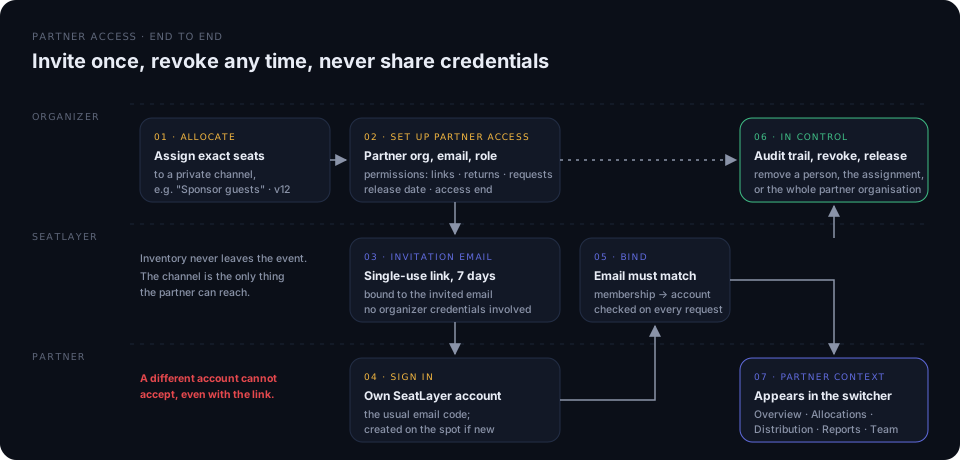
The model, roles, permissions, release date, and revocation rules are on the
[sales channels page](/platform/sales-channels#give-a-partner-its-own-context-partner-access).
## 4. Mint buyer access, from your backend
The agency's backend authenticates its own customer, then asks yours. Yours
decides, then mints.
The complete private-channel sequence is deliberate:
1. The agency verifies the buyer and package entitlement.
2. Its backend asks the promoter backend for access; the browser never calls
SeatLayer's secret-key endpoint.
3. The promoter backend mints a token scoped to `Travel Agency A`, that buyer,
and the agency's exact origin.
4. The browser receives only the short-lived token and expiry in memory, then
gives them to `buyerAccessTokenProvider`.
5. SeatLayer shows only that allocation; the promoter backend inspects the
resulting hold and books it after checkout.
An ordinary Public-sale buyer does none of these steps. Their page mounts with
`publicKey` and SeatLayer starts the public chart directly.
```ts title="promoter-backend/access.ts"
import SeatLayer from "@seatlayer/server";
const seatlayer = new SeatLayer({ secretKey: process.env.SEATLAYER_SECRET_KEY! });
export async function grantAgencyAccess(agencyBuyerId: string) {
// Your rule, not SeatLayer's: is this buyer entitled to the agency block?
const entitled = await agencyContract.isActiveBuyer(agencyBuyerId);
if (!entitled) throw new Error("not entitled");
const session = await seatlayer.channels.createBuyerAccessSession("ev_9f3a", {
channelIds: ["chn_9f1c"],
includePublic: false,
allowedOrigin: "https://booking.travel-agency.example",
expiresInSeconds: 1800,
maxQuantity: 4,
buyerRef: agencyBuyerId,
partnerRef: "travel-agency-a",
clientRequestId: `agency-access-${agencyBuyerId}`,
});
await audit.record({ sessionId: session.sessionId, agencyBuyerId });
// Only these two cross the wire to the browser.
return { token: session.token, expiresAt: session.expiresAt };
}
```
Set these session fields explicitly:
- **`includePublic: false`**: the agency sells its own block, not your public
inventory. There is no default; you must say.
- **`allowedOrigin`**: the agency's exact production origin, checked on every
request.
- **`maxQuantity: 4`**: guest-weighted across *all* that buyer's live holds, so
a second tab does not double the allowance.
- **`partnerRef`**: flows to the report and the booking webhook as the
reconciliation key. It is opaque; it is not a credential.
`clientRequestId` makes the call safe to retry: a repeat revokes the earlier
session and issues a fresh token rather than replaying a stored bearer.
## 5. Mount the map with the token
In the agency's own page, give the SDK a **provider**, not a token. The provider
is called for the initial token and again on expiry, so a buyer who lingers is
refreshed instead of dropped.
```js title="agency-frontend/picker.js"
const chart = new seatlayer.SeatingChart({
container: "#seat-map",
event: "ev_9f3a",
buyerAccessTokenProvider: async ({ reason }) => {
const res = await fetch("/api/seatlayer-access", {
method: "POST",
credentials: "include",
headers: { "content-type": "application/json" },
body: JSON.stringify({ reason }),
});
if (!res.ok) throw new Error("Could not establish access");
return res.json(); // { token, expiresAt }
},
});
await chart.render();
```
The buyer now sees the agency's 200 seats. Everything else reads as one flat
unavailable state. It does not expose whether inventory is booked or held, or
any activity inside public inventory.
## 6. Hold, then book from your backend
The browser holds. It never books.
```ts title="promoter-backend/checkout.ts"
// The agency sends you its order and the holdId the buyer's browser produced.
const hold = await seatlayer.inventory.retrieveHold("ev_9f3a", holdId);
// Authoritative pricing: build the total from this, never from the browser.
const total = hold.items.reduce((sum, i) => sum + i.unitPrice * (i.quantity ?? 1), 0);
if (total !== agencyOrder.total) throw new Error("price mismatch");
await payments.capture(agencyOrder);
await seatlayer.inventory.book("ev_9f3a", {
holdId,
bookingRef: agencyOrder.id,
});
```
This flow has two security properties:
- **The hold is the authority.** `retrieveHold` returns the server's own items,
including the channel and access source captured when the seats were taken.
Comparing that against what the partner claims is how you catch a forged price
or channel.
- **Booking a hold needs no channel argument.** The hold already carries its
authorization, so this works even if the buyer's session has since expired. It
is *direct label booking* (booking without a `holdId`) that must name a
channel on private inventory. See
[the behavior change](/server-api/booking).
## 7. Reconcile
The `seat.booked` webhook names the channel that made the sale:
```json
{
"event": "seat.booked",
"payload": {
"eventId": "ev_9f3a",
"bookingRef": "agency-order-4412",
"items": [
{
"label": "A-12",
"unitPrice": 75,
"currency": "USD",
"channelId": "chn_9f1c",
"channelExternalRef": "travel-agency-a",
"accessSource": "partner",
"partnerRef": "travel-agency-a"
}
]
}
}
```
Attribution is recorded at booking time and never rewritten, so it stays correct
even after you move or archive the channel. Reconcile on `bookingRef`, your own
order id, the partner's order id, `channelExternalRef`, and the delivery's
`occurrenceId`.
For the running totals, read
[`GET /v1/events/:key/channels/report`](/server-api/reports): what each channel
holds now, beside what it sold.
## 8. Wind the allocation down
When the agency's window closes, archive the channel with a destination:
```bash
curl -s -X POST "https://api.seatlayer.io/v1/events/ev_9f3a/channels/chn_9f1c/archive" \
-H "authorization: Bearer $SEATLAYER_SECRET_KEY" \
-H "content-type: application/json" \
-d '{"destination": "public", "reason": "Agency window closed"}'
```
Unsold seats return to Public sale, the agency's buyer sessions are revoked in
the same operation, and the sales it already made stay attributed to it forever.
If anyone is mid-checkout, archive is refused with a `retryAfterMs` rather than
stranding them.
## Go-live checklist
- [ ] The allocation quantity, public-sale access, booking owner, payment owner, and cancellation policy are agreed in writing.
- [ ] Preview matches the intended inventory.
- [ ] If a partner report is shared, its revenue scope and expiry are intentional, and an owner is responsible for revoking it.
- [ ] If Partner access is granted, the role, permissions, release date, and access end match the agreement, and the people invited are the ones who should act for the agency.
- [ ] Test and live credentials and scopes are separate.
- [ ] The exact production origin is registered on the session.
- [ ] Buyer eligibility is authenticated **before** minting, by your rule.
- [ ] The token is memory-only, redacted from logs, refreshed on expiry, and revocable.
- [ ] The hold is inspected and priced authoritatively before payment.
- [ ] Booking uses a stable `bookingRef` and is safe to retry.
- [ ] Allocation exhausted, event closed, access expired, seat conflict, and network errors each show distinct buyer guidance.
- [ ] Webhook signature and replay handling are tested.
- [ ] Public and partner flows are both tested against one live-like event.
- [ ] You can pause access and return unused allocation without a chart republish.
## Related
- [Partner guide: sell an allocation](/integrations/partner-selling/): the invited partner's hosted-link and own-system guide
- [Sales channels and allocations](/platform/sales-channels/)
- [Channels API](/server-api/channels) · [Buyer access sessions](/server-api/buyer-access-sessions)
- [Hosted access links](/server-api/channels): when you cannot authenticate each buyer
- [Ticketing backend integration](/integrations/ticketing-backend)