---
title: "Sales channels and allocations"
description: "Split one event into sales channels and allocations for partners, presales, sponsors, and box office without splitting the seat count."
---
A sales channel is an **allocation label** on inventory you already have. It
primarily answers *which buyers are allowed to select this seat before it
sells?* and can optionally carry a sparse price book for that audience.
Everything else stays exactly where it was. One event, one chart, one
authoritative seat count.
This is the canonical **feature overview** for channels, allocation, organizer
controls, and Partner access. Continue according to your role:
| Your job | Read next |
|---|---|
| Configure an allocation and connect an authenticated private selling flow | [Organizer guide: integrate private sales](/integrations/private-and-partner-sales/) |
| Operate inventory an organizer assigned to your organisation | [Partner guide: sell an allocation](/integrations/partner-selling/) |
| Implement exact allocation and lifecycle operations | [Sales Channels API](/server-api/channels/) |
| Mint short-lived browser authority for private inventory | [Buyer Access Sessions API](/server-api/buyer-access-sessions/) |
## The one-minute model
Take a 1,000-seat event:
| Allocation | Seats | Who may select them |
|---|---:|---|
| Public sale | 800 | Anyone on a Managed public page or a public-key Platform embed |
| Travel Agency A | 120 | Buyers carrying an Agency A buyer access session |
| Sponsor guests | 50 | Sponsor invitees |
| Box office | 30 | Your own staff selling flow |
All four audiences read the same event, the same chart geometry, and the same
inventory. Selling `A-12` through Travel Agency A makes `A-12` booked
**everywhere, immediately**: on the public page, in your reports, and in every
open buyer session. There is no reconciliation step or second source of
truth, because there is no second inventory.
## Assignment is not status
A seat's **channel** and a seat's **status** are independent. Every seat always
has both.
| | |
|---|---|
| **Status** | `free`, `held`, `booked`, `blocked`: what is physically true |
| **Channel** | Public sale, or exactly one private channel: who may select it |
Assigning a seat to a channel never changes its status. A free seat in a private
channel is still free; it is simply invisible to buyers who are not eligible for
that channel. This is why assignment is safe to run on a live, selling event.
It is also why a channel is not a way to take a seat off sale. If nobody should
sell it, block it.
## What a channel is not
The five things that get confused with channels, and the feature that actually
does each job:
| What you want | Use |
|---|---|
| Nobody may sell this seat | [Block](/server-api/blocking) |
| Reserve it during checkout | [Hold](/server-api/holds) |
| Open or close a section for everyone | [Section availability](/server-api/inventory) |
| Change the event's base price or visual treatment | [Category and pricing](/designer/accessibility-and-pricing) |
| Give one allocated audience a different price | **Sales channel pricing** |
| Let only a particular audience select it | **Sales channel** |
## One seat, one channel
A seat belongs to Public sale or to exactly one private channel. Never two.
Overlapping membership makes "how many seats does the sponsor have?"
unanswerable and turns every allocation edit into a precedence question. A
buyer may see several allocations, but a seat belongs to only one. A
[buyer access session](/server-api/buyer-access-sessions) can name several
channels at once, so a sponsor who is also an agency customer sees both
allocations without either seat being in two places.
That keeps every allocation total exact and every seat's answer to "whose is
this?" a single value.
## Public sale is a real allocation, not an absence
Seats not assigned to a private channel are **Public sale**. It behaves like any
other allocation in reports and in the API, with counts, sell-through, and
inventory movements. Two differences apply:
- it is the default, so every event you already have is entirely Public sale and
stays that way until you say otherwise. There is no migration;
- a Managed public/unlisted event needs no grant for Public sale, while a
Platform/SDK embed uses its publishable `publicKey` to obtain an
origin-bound, Public-only session directly from SeatLayer.
In the API, Public sale is the reserved channel id `public`, and a seat on
public sale reports `channelId: null`. The direct public-key bootstrap fixes its
scope to Public sale and accepts no browser-supplied channel list. A server-requested
[buyer access session](/server-api/buyer-access-sessions) must still say
`includePublic` explicitly. There is no default, and it is required whenever the
buyer also needs private channel inventory.
## Manage a channel in Control Room
Open the event, choose **Channels**, and use the channel rail as one continuous
workflow: allocate inventory, choose how it is distributed, then preview what
that audience can see.
### Assign inventory at the right scale
Choose the destination channel first, then select inventory in the way that
matches the job:
- **Sections** adds one or more complete sections;
- **Rows** adds several logical rows, including segmented rows shown as one row;
- **Drag box** selects a region directly on the map;
- **Category** adds every seat in a price or access category;
- **Seat list** provides the same selection with keyboard-accessible checkboxes;
- clicking individual seats remains available for small corrections.
Selections are additive and stay staged until you review and apply them. The
review separates seats added from Public sale, seats moved from another private
channel, seats already at the destination, and seats that cannot move because
they are held or booked. Moving inventory out of another private channel is the
only ordinary assignment that needs an extra confirmation.
Category, section, and row selection expand to the exact inventory units that
exist when the assignment is applied. They are not permanent allocation rules:
after publishing new seats or changing labels, review the Channel again because
new inventory starts on Public sale until it is deliberately assigned.
After Apply, the review closes and a success bar reports exactly how many seats
moved and how many were skipped. **Details** keeps the authoritative server
breakdown available without making it a second required step.
### Choose a distribution method
Open a private channel and choose **Distribute this channel**. Only the setup for
the selected method is shown:
| Method | Use it when |
|---|---|
| **Keep as protected reserve** | Nobody should have buyer access yet. The inventory remains outside Public sale. |
| **Sell through your own staff** | Box office or internal staff fulfil the allocation. |
| **Sell with a buyer link** | You want to send a hosted capability link to guests, sponsors, or a known group. |
| **Integrate a website or app** | For this private channel, your backend authenticates each eligible buyer and creates a short-lived, scoped buyer session. Ordinary Public sale uses `publicKey` directly and does not call this endpoint. |
Changing the distribution method does not move seats. A self-service method is
marked **Set up** until an active link or buyer session exists, and **Live** only
when the server confirms buyer access is active.
### Set a channel price only where it differs
Open a private channel and choose **Edit prices**. Each blank field inherits the
event's current category or ticket-tier price; enter only the audience prices
that differ. Saving is versioned, so if another operator changed this price book
while you were editing, Control Room refreshes the current values and asks you
to review instead of overwriting them.
Channel pricing is authoritative, not a display hint. The buyer sees the scoped
price, the server resolves it again when the hold is created, and that hold
freezes both the unit price and channel pricing version. A later edit changes
future selections only. Public inventory and private inventory without an
override continue to use event pricing.
If an active event ticket release overlaps a channel price, the narrower channel
price wins and does not consume the release quota. At the Box Office, staff can
deliberately select a named release; that explicit choice wins over the channel
price and retains the release attribution.
### Give a partner its own context: Partner access
When an agency, sponsor, school, corporate group, promoter partner, or reseller
needs to work its allocation rather than only read a report, open the private
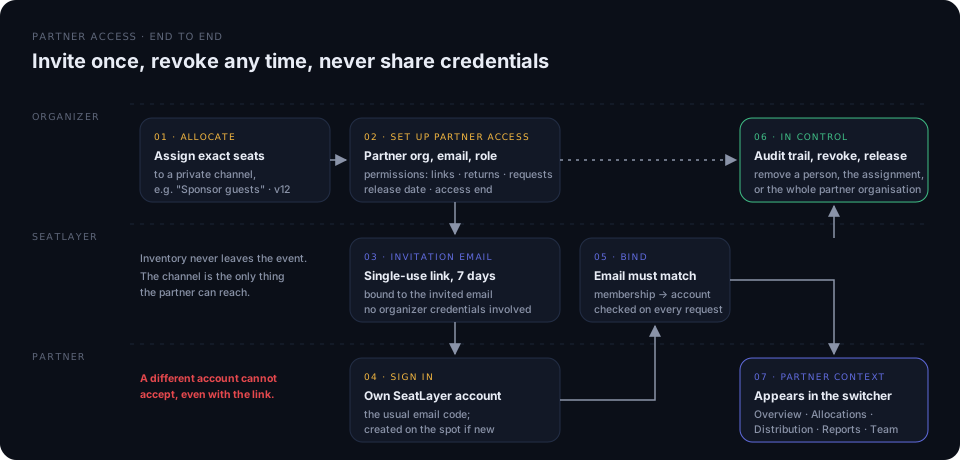
channel and choose **Partner access**. Name the partner organisation, invite
one person by email, pick a role, and choose the permissions that channel
carries.
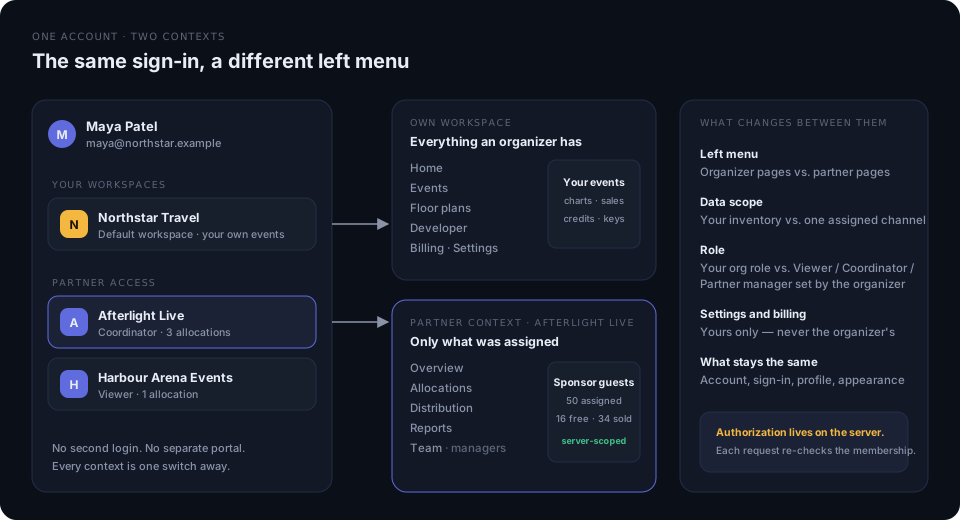
The partner does **not** get a login to your workspace and there is no separate
portal. They accept with their own SeatLayer account (the invitation only works
for the invited email; a new account is created on the spot if needed), and the
access appears in their workspace switcher next to their own workspaces. Their
own events, floor plans, and billing stay in their workspace; your channel lives
in a *partner context* with its own left menu: Overview, Allocations,
Distribution, Reports, and Team.
#### Roles
| Role | Can |
|---|---|
| **Viewer** | See the assigned allocation, exact seats, attributed sales, and export the CSV. |
| **Coordinator** | Viewer, plus the write actions you enable: create and revoke buyer links, return free seats, request more inventory. |
| **Partner manager** | Coordinator, plus invite and remove people in the partner organisation and change their roles. |
Roles are set per person. You can change a role or remove a person at any time,
and a Partner manager can do the same for their own teammates from the Team
page (never for themself). A change takes effect on the partner's next request.
#### Permissions and terms on the assignment
| Setting | Effect |
|---|---|
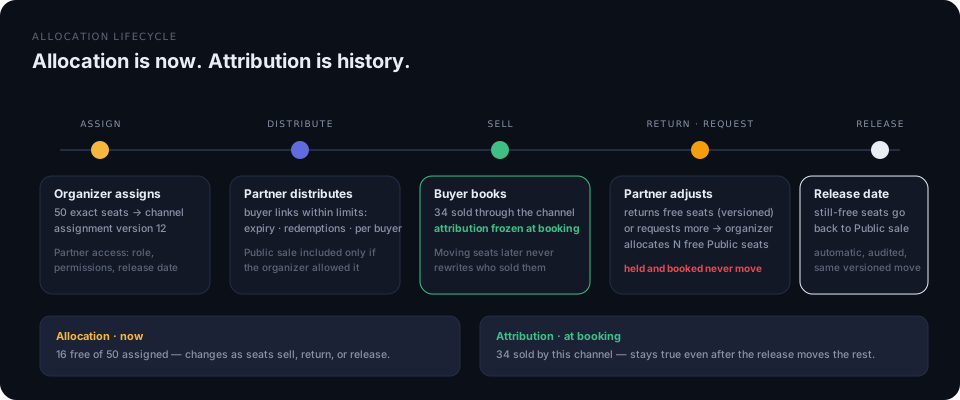
| Create buyer links | Hosted buyer links inside your limits (expiry, redemptions, seats per buyer, session length). Only offered on events sold through SeatLayer checkout. |
| Show Public sale in links | Off by default; when on, the partner may let its buyers also pick from public inventory. |
| Return free inventory | Free seats only, against the assignment version the partner reviewed; held, booked, and blocked seats never move. |
| Request more inventory | One open request at a time. You allocate N free Public-sale seats directly from the request, mark it handled, or decline. |
| Release date | At that moment, whatever is still free in the channel returns to Public sale automatically, audited, through the same versioned move. |
| Access ends | The context disappears for every member after this date. |
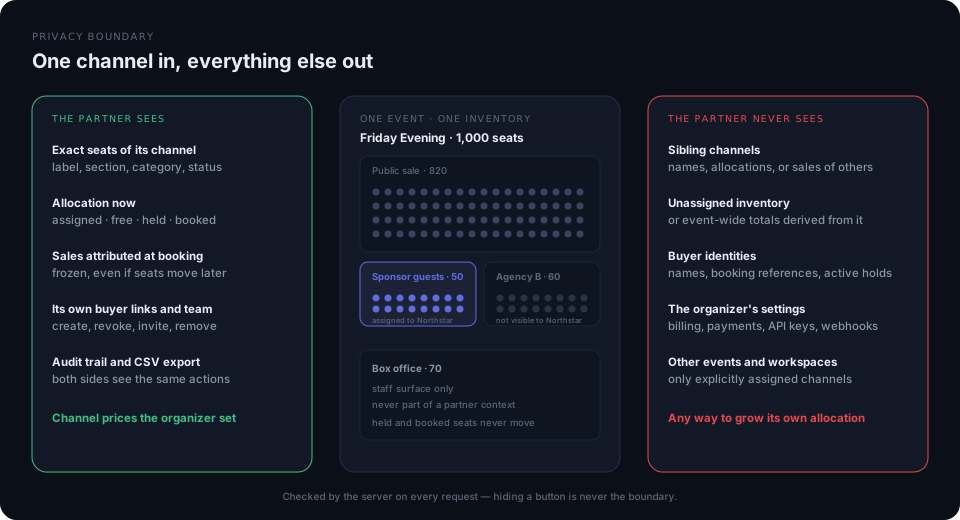
Every partner request is authorised on the server against the membership,
assignment, role, and enabled permission. Hiding a button is not an
authorisation boundary. A partner cannot expand its own allocation, see a sibling channel,
buyer identities, booking references, or anything in your settings and billing.
#### Revoking
- **Remove a person**: that account loses the partner context for every
allocation you have given that partner organisation.
- **Remove the assignment**: the channel leaves every member's context; the
inventory does not move.
- **Remove the partner organisation**: ends every assignment of that partner in
your workspace.
Existing buyer holds keep their ordinary lifecycle. Buyer links the partner
created stay live until you revoke them from the channel's access links, so
buyers who already received a link are not cut off by surprise.
### Preview before distribution
Use **Preview buyer access** to request the same server projection a buyer
session receives. This checks the real channel scope and optional Public sale
access; it is not a browser-side approximation and cannot create holds.
### Share a live report with the channel partner
From **Performance → Channel**, choose **Share partner report** on a private
channel. The partner opens a clean, read-only report with:
- the selected channel's allocation, sell-through, and attributed sales;
- the exact assigned seat or inventory labels and their current status;
- search and status filters for large allocations; and
- a CSV export of that same scoped inventory.
Other channel names, buyer identity, booking references, and event-wide totals
are never included. Attributed revenue is off by default and must be enabled for
each link. Creating and revoking links remains an organizer action; the partner
does not need a SeatLayer account.
The URL is shown once, can expire after 7–180 days, records its view count and
last-viewed time, and can be revoked immediately. It is a bearer capability, so
forwarding it gives the recipient the same read-only access.
For a recurring partner that needs organizer-approved distribution, return, or
request actions, use **Partner access** instead. It keeps the same event/channel
privacy boundary while binding access to the partner's own verified SeatLayer
account rather than a shared report URL.
## A channel id is not authorization
A channel id is a **label**, not a key. Sending one from a browser grants
nothing, and a browser cannot select private inventory by naming a channel it
guessed, was told, or read out of your page source. The server derives what a
caller may select from the credential the caller presents, and ignores any
channel the client claims.
What actually grants access:
- a [buyer access session](/server-api/buyer-access-sessions) (`bse_…`), requested
by your backend and minted by SeatLayer for one buyer, one event, one origin,
and a named set of channels;
- a [hosted access link](/server-api/channels), which a buyer exchanges for one
of those sessions;
- a Partner access membership, checked on every request against the partner's
own verified account, the assignment, the role, and the permission set;
- a secret key that explicitly names the channel it is acting for. See the
[booking behavior change](/server-api/booking).
An unauthorized buyer does not receive a private seat's real state at all.
Private inventory reads as one flat unavailable state, whatever is really
happening inside it, and a public map receives no updates from activity it is
not allowed to observe.
## Continue by role
- [Partner guide: sell an allocation](/integrations/partner-selling/): hosted-link selling and the organizer-brokered SDK path
- [Sales Channels API](/server-api/channels/): create, price, assign, pause, and archive
- [Buyer Access Sessions API](/server-api/buyer-access-sessions/): mint and revoke buyer scope
- [Organizer guide: integrate private sales](/integrations/private-and-partner-sales/): the end-to-end implementation
- [Reports](/server-api/reports): allocation and sale attribution per channel