
The Flutter picker is one native widget tree over one drawn map, joined by a single seam. Understanding that seam is what makes the customisation and composition guides obvious rather than magical.
The layers
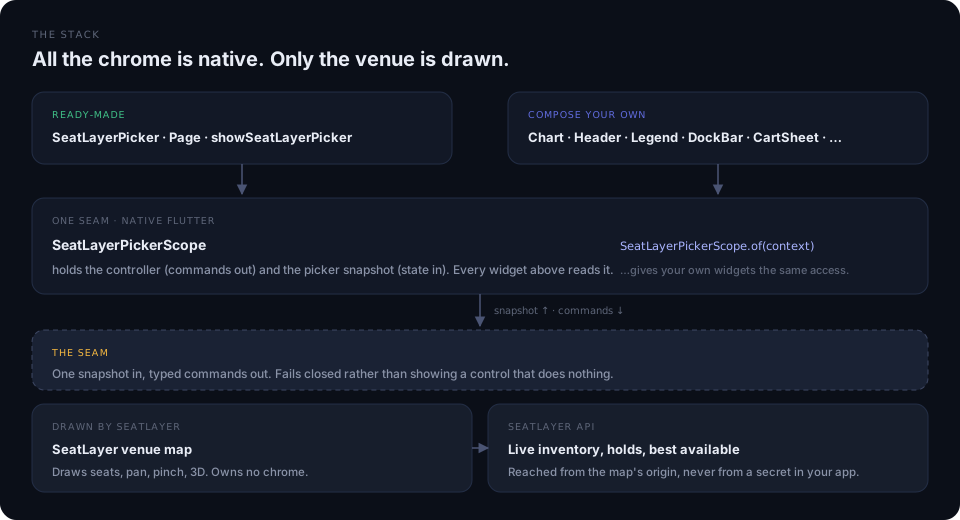
| Layer | What lives there | Who owns it |
|---|---|---|
| Your app | Routes, navigation, checkout, analytics | You |
| Picker widgets | Header, legend, dock, confirm card, cart, 3D chrome | Flutter, yours to change |
| Scope and controller | SeatLayerPickerScope, SeatLayerPickerController, SeatLayerPickerState |
The SDK |
| Venue map | The drawn venue, pan, pinch, 3D scene | SeatLayer |
| API | Live inventory, holds, best available | SeatLayer |
Two rules bind the whole design:
- The venue map owns the venue; native owns the chrome. The map knows Flutter owns the furniture, so it draws no seat tooltip, test-mode badge, or attribution of its own. Exactly one of each is drawn in Flutter.
- A row name may already contain its section. The SDK prints row labels
with the section prefix removed, so a card reads
Stalls D · Row Crather thanStalls D · Row Stalls D C.
Picker state is the seam
State reaches Flutter as a complete replacement, never a patch. Dart ignores stale state and serialises inventory-changing actions, so a repeated checkout tap cannot produce two holds.
| State field | What it carries |
|---|---|
event |
key, name, venue, mode, currency, startsAt, salesClosed |
branding |
brandName, logoUrl, attributionRequired, organizer palette |
categories |
key, label, color, priceMin, priceMax, available, tiers |
sections |
id, label, displayLabel, zoneId, color, dominantCategoryKey, seatsLeft, priceMin, priceMax |
zones |
id, label, color, plus bestAvailableZones |
map |
rung, focusedSectionId, focusedSection, viewMode, buyerView, floors, activeFloorId, floorMode, categoryFilter, accessibilityFilter, colorblindSafe, canZoomIn, canZoomOut, viewportInsets |
selection |
SelectedSeat per seat: label, section, row, seat number, price, tiers |
cartLines |
SeatLayerCheckoutLineItem per line, with cartTotal and ticketCount |
hold |
active, expiresAt, owner. Never the hold id |
capabilities |
Which optional features are available on this event |
accessStatus |
Whether buyer access is configured, and why not |
The map state’s rung is the vocabulary the whole picker navigates by:
venue is the overview, and seats means a section is focused and its seats
are revealed.
Commands go the other way
SeatLayerPickerController is a ValueNotifier<SeatLayerPickerState> and the
only thing that drives the map. Its surface is typed Dart, not raw strings:
| Group | Methods |
|---|---|
| Navigation | focusSection, overview, setRung, setFloor, showAllFloors |
| Selection | selectObjects, deselectObjects, selectCategories, deselectCategories, removeObject, clearSelection, setSelectableObjects, setMaxSelection, setSeatTier |
| Filters | setCategoryFilter, setAccessibilityFilter, setLimitedViewHidden, setColorblindSafe |
| View | setViewMode, setBuyerView, showSeatIn3D, openSeatView, set3DNavigationMode, zoomIn, zoomOut, zoomToFit |
| Inventory | bestAvailable, setGeneralAdmissionQuantity, setTableQuantity, resumeHold, extendHold |
| Handoff | checkout, rejectCheckoutHandoff, releasePickerOwnedHold |
| Surface | setViewportInsets, setMapInteractionEnabled, setCartSheetExpanded, setThemeMode |
| Lifecycle | synchronize, retry, setLifecycle, close, destroy, dispose |
Read state without owning a controller through the scope’s static lookups:
SeatLayerPickerScope.stateOf(context),
SeatLayerPickerScope.controllerOf(context),
SeatLayerPickerScope.brightnessOf(context), and
SeatLayerPickerScope.stringsOf(context) among them. See
building your own layout for how a custom
widget uses them.
From a tap to a handoff
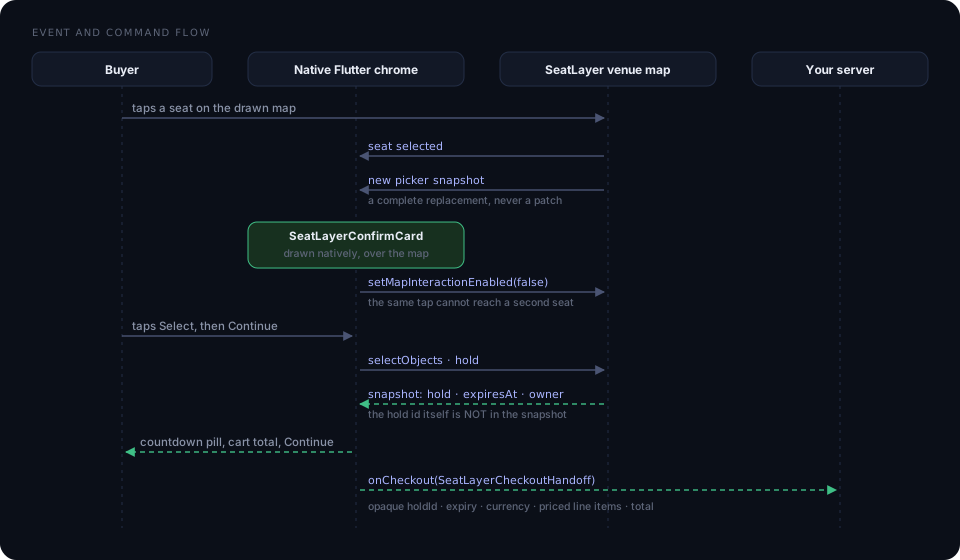
Two details in that flow are load-bearing.
The map is made inert, not just ignored. While native decision chrome is
up, the picker makes the map itself inert, and a Flutter IgnorePointer sits
over it as a second layer. Both are required: the map surface can be hit-tested
beneath composited Flutter chrome even when the Flutter child ignores pointers,
so the originating tap would otherwise select a second seat underneath. As soon
as the prompt closes, the map owns pan and pinch again.
Native chrome tells the map where it can draw. setViewportInsets reports
how much of the map surface your chrome covers, so the map frames a focused
section, the venue overview, and a best-available result into the part the
buyer can actually see. It is a framing inset, not a clip. The venue still
draws and pans underneath. The drop-in reports its own rail and dock automatically; a
custom layout reports its own.
The back-navigation ladder
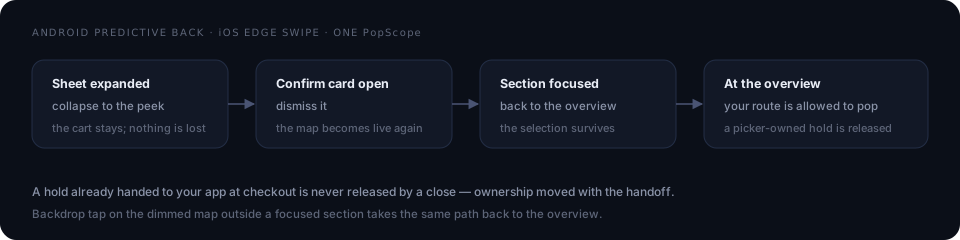
One PopScope owns all four rungs, so Android predictive back and the iOS edge
swipe take the same path a buyer expects. A hold already handed to your app is
never released by a close, because ownership moved with the handoff.
The picker fails closed
The SDK reports which optional capabilities are available for the current Event. When a feature is unavailable, its control is absent rather than decorative. The picker never shows a button that silently does nothing.
That gating is what makes new features additive. SeatLayerFloorStrip draws
nothing on a venue with fewer than two floors; SeatLayerSeatViewChrome prints
the seat-view caption natively only where the map has handed those words over,
and otherwise leaves the map to draw them. An app pinned to an older release
behaves exactly as it did before.
Where credentials live
Buyer access tokens stay in memory. They never appear in a URL, picker state, or application event, and the picker’s state model has no field that could carry one. Your app never holds a SeatLayer secret; for gated inventory it supplies a callback that asks your backend to mint a short-lived native buyer session.