
The official SeatLayer Flutter seat map SDK is a native picker. The venue
map is drawn by the SeatLayer venue map; the header, price legend, dock bar,
seat confirmation, cart sheet, checkout button, and 3D controls around it are
ordinary Flutter widgets you can theme, restyle, translate, replace, or place
yourself. The
seatlayer package on pub.dev ships the
drop-in picker, every widget behind it, a typed controller, and structured
errors for live availability, seat selection, temporary holds, best-available
seating, and a typed checkout handoff.
Inspect the immutable v0.12.0 source and runnable example,
learn about the SeatLayer reserved-seating platform, or
explore the wider buyer experience in the
browser seat-map demo. The
browser demo is product proof, not a Flutter application.
Install the package
flutter pub add seatlayer:0.12.0Pin the version explicitly in pubspec.yaml so a buyer-facing surface never
moves on its own:
dependencies:
  seatlayer: 0.12.0
0.12.0 is the current version (checked 25 September 2026), and the native picker described here
ships in it. It supports Flutter applications on iOS and Android; it does not
currently claim Flutter web, macOS, Windows, or Linux support.
The package requires Flutter 3.19.0 or newer and Dart 3.4.0 or newer. The
SDK catalog is the machine-readable version and
surface authority for automated setup.
Which way in do I need?
There are three, and they are a ladder: take the next rung only when the one below it cannot express what you want.
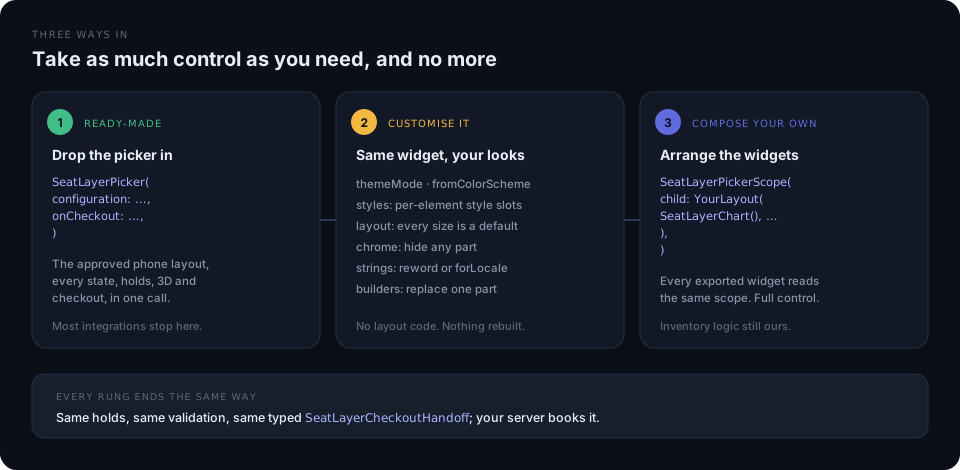
| You want | You reach for | Guide | |
|---|---|---|---|
| 1 | The buyer flow, working, today | SeatLayerPicker |
This page |
| 2 | The same flow, in your brand and wording | theme · options · builders |
Customise the picker |
| 3 | Your own arrangement of the parts | SeatLayerPickerScope |
Build your own layout |
Rung 2 is where most branding work ends: a ColorScheme, a handful of style
slots, a chrome switch or two, and one builder to swap a single part. You only
need rung 3 when the arrangement has to differ: a persistent sidebar, a
tab-embedded map, a bespoke sheet already in your design system.
Every rung produces the same holds, the same validation, and the same typed
SeatLayerCheckoutHandoff, so moving up a rung never means reimplementing
inventory logic.
What is native, and what is drawn
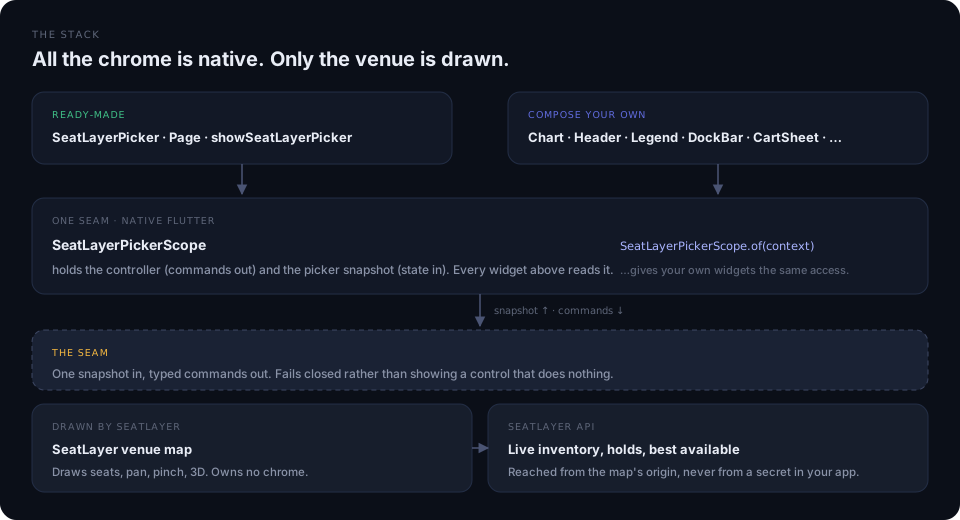
The SeatLayer map owns the drawn venue: seats, sections, pan, pinch, and the 3D scene. Everything the buyer reads or presses outside the map is a Flutter widget in your tree, so the two never draw the same control twice.
That seam is one picker state: a complete read-only view carrying the event, sections, categories, selection, cart, hold, floors, and the current rung. The architecture page documents it, along with the command flow and the back-navigation ladder.
Drop the picker in
One widget, the complete buyer flow, on the approved phone layout:
import 'package:flutter/material.dart';
import 'package:seatlayer/seatlayer.dart';

SeatLayerPicker(
  configuration: SeatLayerConfiguration(
    event: '<YOUR_EVENT_KEY>',
    publicKey: '<YOUR_PUBLIC_KEY>',
  ),
  themeMode: SeatLayerThemeMode.auto,
  onCheckout: (handoff) => bookOnYourBackend(handoff.holdId),
  onClose: () => Navigator.of(context).pop(),
)
SeatLayerPickerPage is the same picker as a full route, and
showSeatLayerPicker presents it adaptively: edge-to-edge on a compact phone,
a constrained dialog at 700 logical pixels or wider. It returns the handoff, or
null when the buyer closes it:
final handoff = await showSeatLayerPicker(
  context,
  configuration: configuration,
  presentation: SeatLayerPickerPresentation.adaptive,
);

if (handoff != null) {
  openCheckout(holdId: handoff.holdId);
}
Give the picker bounded space: an Expanded child or a full-screen route. Do
not nest the map inside a competing gesture-driven ListView or
SingleChildScrollView: the buyer canvas owns pan and pinch, and the SDK
already disables document zoom, overscroll, and edge glow inside the venue map,
so no gesture workaround is needed on your side.
Optional prewarm
SeatLayerPicker.prewarm() is an optional API that prepares the picker before
navigation. It is safe to call on every build; an unused prewarm is
released after a few minutes or on memory pressure, and
SeatLayerPicker.cancelPrewarm() releases it early.
@override
void initState() {
  super.initState();
  SeatLayerPicker.prewarm();
}
The buyer journey
OverviewThe venue, whole
SeatLayerChart draws the venue. SeatLayerPriceLegend chips filter it by price, and SeatLayerFloorStrip appears only on a venue with more than one floor.
SectionSeats are revealed
Tapping a section frames it clear of your native chrome. Pinch out or Show whole venue returns to the overview. SeatLayerDockBar, off by default, can name the section and step to the next one.
SeatOne seat is chosen
View from here and See it in 3D are offered where the venue supports them. SeatLayerVenue3D owns the immersive scene and its own native chrome.
Confirm cardThe decision, natively
SeatLayerConfirmCard states the seat's identity, price, and notes such as wheelchair space or restricted view, with Cancel beside Add seat. The map is made inert underneath so the same tap cannot pick a second seat.
CartTickets and total
SeatLayerCartSheet shows the total and the button when collapsed and opens to one card per ticket. Tapping a card takes the map to that seat.
CheckoutA typed handoff
SeatLayerBookButton holds the seats and calls onCheckout with an opaque holdId, its expiry, priced line items, and a display total. Your server books it.
A single PopScope walks that ladder backwards, so Android predictive back and
the iOS edge swipe both behave. Haptic cues fire on selection, section focus,
hold creation, and hold expiry, and every animation collapses under
MediaQuery.disableAnimations.
The widgets
Every widget marked standalone can be placed anywhere inside a
SeatLayerPickerScope.
| Widget | What it is | Standalone |
|---|---|---|
SeatLayerPicker |
The drop-in buyer flow | n/a |
SeatLayerPickerPage |
The same picker as a full route | n/a |
SeatLayerPickerScope |
The state every widget below reads | n/a |
SeatLayerChart |
The drawn venue map | yes |
SeatLayerPickerHeader |
Event identity, hold pill, dismiss | yes |
SeatLayerPriceLegend |
Price chips that filter the map | yes |
SeatLayerDockBar |
Focused section, prev/next, overview (off by default) | yes |
SeatLayerFloorStrip |
Floor chips on a multi-floor venue | yes |
SeatLayerPickerMapControls |
Accessibility, fit, and Map/3D in the corners | yes |
SeatLayerConfirmCard |
The one-seat decision card | yes |
SeatLayerCartSheet |
Collapsed total and button, opens to the cart | yes |
SeatLayerCartList |
The buyer’s tickets, one card each | yes |
SeatLayerBestSeatsForm |
Two selects, a stepper, one action | yes |
SeatLayerBookButton |
The full-width checkout call to action | yes |
SeatLayerVenue3D |
Caption, seat stepper, and exits over the 3D scene | yes |
SeatLayerSeatViewChrome |
The seat-view caption and disclosure badge | yes |
SeatLayerPickerAccessibilityFilters |
Access needs and the colorblind palette | yes |
SeatLayerPickerTablePrompt |
Table quantity prompt | yes |
SeatLayerPickerGeneralAdmissionPrompt |
General-admission quantity prompt | yes |
The individual map buttons are exported too, for a layout that places them
itself: SeatLayerPickerZoomInButton, SeatLayerPickerZoomOutButton,
SeatLayerPickerZoomToFitButton, SeatLayerPickerOverviewButton,
SeatLayerPickerViewModeButton, SeatLayerPickerColorblindButton, and
SeatLayerPicker3DNavigationModeButton.
Hand the hold to checkout
onCheckout receives a SeatLayerCheckoutHandoff: an opaque holdId, the
server-side expiresAt, the currency, lineItems carrying object, category,
tier, and seat identity, and a display total. Ordinary picker state
deliberately does not contain the holdId. It crosses into Dart only at
this boundary.
SeatLayerPicker(
  configuration: configuration,
  onCheckout: (handoff) async {
    await yourBackend.beginOrder(holdId: handoff.holdId);
  },
)expiresAt, lineItems, and total are useful for native display, but they
are not payment authority. Your backend derives the price from the inspected
hold.
Keep the security boundary explicit:
- The Flutter app selects seats and creates a temporary hold.
- Your backend inspects the hold and derives the amount to charge.
- Your payment and order workflow stays outside the venue map.
- Your backend reuses one
bookingRefso retries are safe. - Expiry and inventory conflicts return buyers to a recoverable selection state.
Calling checkout transfers hold ownership to your app, so closing the picker
afterwards does not release it. Before the handoff, closing the picker does
release a picker-owned hold. If your onCheckout throws because host validation
or navigation failed, the picker rejects the handoff before surfacing your
error, returning the seats rather than stranding them until the server TTL.
Continue with holds and checkout before connecting a production order flow.
Public, private, and gated inventory
For an ordinary Public sale, match pk_test_… to a test Event or pk_live_…
to a live Event. The SDK obtains Public-only access and keeps the grant in
memory.
For login-gated, presale, partner, or channel inventory, replace publicKey
with a provider that calls your backend and mints a short-lived native buyer
session through
POST /v1/events/:key/buyer-access-sessions.
Return only its token to the provider and treat the SDK access context as
opaque. An explicit provider or token always wins over publicKey:
final configuration = SeatLayerConfiguration(
  event: 'ev_private',
  buyerAccessTokenProvider: (request) =>
      buyerBackend.mintSeatLayerAccess(request.reason),
);
Never mint a buyer session with a SeatLayer secret inside the app. Access tokens stay in memory and are never placed in page URLs or emitted as application events.
Read-only inspection
SeatLayerPickerOptions(readOnly: true) inspects a map, the current selection,
or a restored hold without allowing inventory changes. Selection, holds, Best
Available, and checkout are disabled, and the controller enforces the same
boundary before sending a command. A custom widget cannot bypass the interface
guard, and gets a typed SeatLayerError with code read_only. Category and
accessibility filters, section and floor navigation, view modes, and zoom stay
available.
See the shipped example
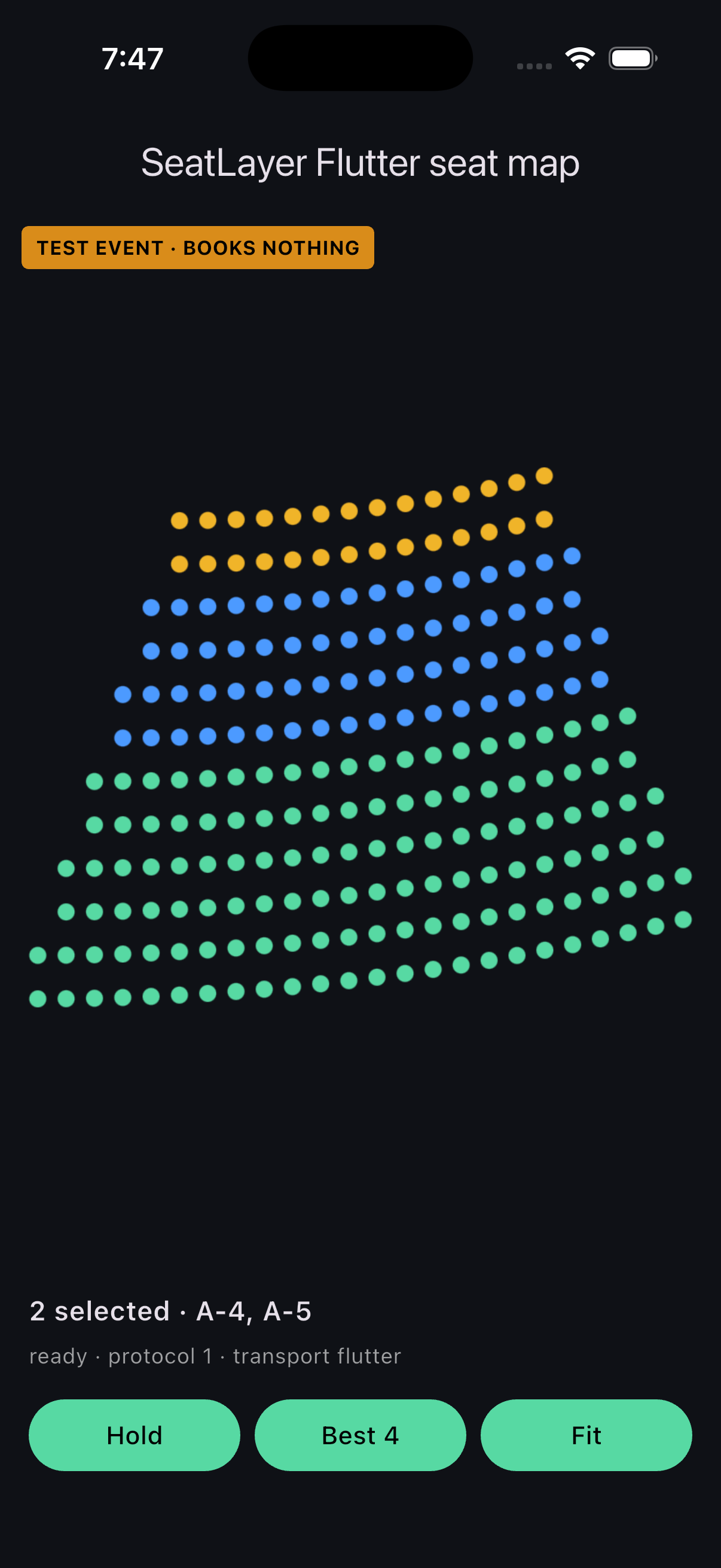
The repository example running the Flutter picker and the venue map in the iOS Simulator.
The runnable Flutter v0.12.0 example
opens on the live picker, and a packaged offline fixture is included as well, so
you can verify rendering, selection, holds, and best-available behavior without
a live event key.
git clone --branch v0.12.0 --depth 1 https://github.com/seatlayer/seatlayer-flutter.git
cd seatlayer-flutter/example
flutter pub get
flutter run --dart-define=SEATLAYER_EVENT="<YOUR_EVENT_KEY>" \
  --dart-define=SEATLAYER_PUBLIC_KEY="<YOUR_PUBLIC_KEY>"
The fixture does not simulate live inventory or production checkout. Connect a SeatLayer test event and your backend when validating expiry, contention, access, payment, and booking.
Advanced: the raw seat map
Use SeatLayerView with SeatLayerController only when your application wants
to own every part of the buyer experience, including chrome, selection
presentation and hold orchestration, without the picker’s state model. It
preserves the 0.2.x API and remains source-compatible in 0.3:
SeatLayerView(
  controller: controller,
  configuration: SeatLayerConfiguration(
    event: '<YOUR_EVENT_KEY>',
    publicKey: '<YOUR_PUBLIC_KEY>',
    currency: 'USD',
  ),
  onReady: (info) => debugPrint('SeatLayer ready: ${info.mode.raw}'),
)
Raw commands include hold, resumeHold, extendHold, release,
releaseLabels, bestAvailable, holdGA, getSelection, clearSelection,
getCurrentHold, setFloor, setViewMode, getViewMode, zoomIn, zoomOut,
zoomToFit, and destroy. Typed streams include onReady,
onSelectionChanged, onHold, onHoldRestored, onHoldExpired,
onBuyerAccessExpired, onSelectedObjectsUnavailable, onError, and
onUnknownEvent. Unknown future enum values and events stay forward-compatible
instead of crashing an older application.
Most integrations should not start here. Rung 3, building your own layout from the picker widgets, gives the same freedom of arrangement while keeping holds, validation, and the checkout handoff. Use the dedicated raw-map guide when that lower-level surface is intentional.
Product scope
Flutter 0.12.0 accepts one published Event key per picker. The browser SDK has
separate Performance Group and
Season products; this Flutter release does not document
either as a native configuration. See the shared
mobile product boundary.
Integration checklist
- Give the picker a full-screen route or a parent with bounded height.
- Keep one controller for one picker lifecycle and dispose it with the screen.
- Pin an exact package version and read the changelog before moving it.
- Preserve the hold id across checkout navigation or app suspension if your product promises restoration.
- Test rotation, safe areas, keyboards, back navigation, suspension, and resume in both light and dark.
- Verify selection, hold, expiry, release, conflict, and booking with a test event.
- Smoke-test supported physical iOS and Android devices before rollout.
Frequently asked questions
Is SeatLayer a Flutter widget or a JavaScript snippet?
It is a native Flutter picker, and every control is a Flutter widget.
SeatLayerPicker and every widget around it are ordinary Flutter widgets with a
typed Dart controller: the header, legend, dock, confirm card, cart sheet, and
checkout button are all native Flutter, and your app talks to the SeatLayer
venue map through Dart commands and callbacks rather than an untyped JavaScript
snippet.
Do I have to use the drop-in layout?
No. SeatLayerPicker is one call, but every widget it composes is exported and
works standalone inside a SeatLayerPickerScope. You can hide parts, replace one
through a builder, restyle a single control through a style slot, or build the
whole layout yourself and still get the same holds, validation, and checkout
handoff.
Which Flutter platforms are supported?
iOS and Android are supported. The package does not currently advertise Flutter web or desktop support.
Does the picker follow my app’s dark mode?
Yes. From 0.3.1, SeatLayerThemeMode.auto reads your app’s theme first and
the device only as a fallback, and both readings are live: flipping either
repaints the chrome and the drawn map together, without a reload and without
losing the selection. .light and .dark pin one side.
Can I brand it from my existing color scheme?
Yes. SeatLayerPickerThemeData.of(context) or .fromColorScheme(scheme) maps a
Material palette onto the whole picker in one call. Ticket-category colors are
deliberately untouched, because they stand for prices set by the organizer.
What languages does the picker speak?
The drawn map ships 37 languages, and SeatLayerPickerStrings.forLocale gives
the native chrome the same reviewed wording. Any entry with no translation keeps
its English default, and every string remains individually overridable.
Can I evaluate the seat picker without a live event?
Yes. Run the repository example to exercise the picker, the venue map, selection, holds, and best-available behavior against the offline fixture. Use a test event for live availability, expiry, access, conflict, and checkout validation.
Does the Flutter application book seats or process payment?
No. It selects inventory and creates a temporary hold. Your trusted backend inspects the hold, processes the order, and books the seats.
Does the Flutter SDK include a 3D seating chart?
Yes. SeatLayerVenue3D is a real, lazily loaded 3D venue scene with its own
native caption, seat stepper, and exits, alongside the authored or
chart-derived view from a seat. The map stays interactive while the scene loads,
and unsupported devices keep the complete 2D flow instead of showing a dead
control. enable3D, enableSeatView, and max3DSeats constrain or disable it.
Is the browser buyer demo a live Flutter demo?
No. It demonstrates the wider SeatLayer buyer journey in a browser. The repository example and the iOS Simulator capture above are the Flutter-specific proof.
Next steps
- Understand the architecture
- Customise the picker
- Build your own layout
- Handle lifecycle and recovery
- Use the raw map
- Troubleshoot mobile integrations
- Install exact Flutter
0.12.0 - Browse the tagged configuration API
- Browse the tagged controller API
- Read the
v0.12.0changelog - Connect holds to secure checkout
- Compare every mobile SDK