
This is rung 3 of the three ways in. Reach for it when the arrangement has to differ: a persistent sidebar, a map embedded in a tab, a sheet that already exists in your design system. If you only need different colours, wording, sizes, or one replaced part, rung 2 on the customise page is less code and less to maintain.
You are rearranging presentation, not reimplementing anything. Inventory, availability, validation, holds, expiry, and the checkout handoff all still come from the same controller.
Which widget owns which region
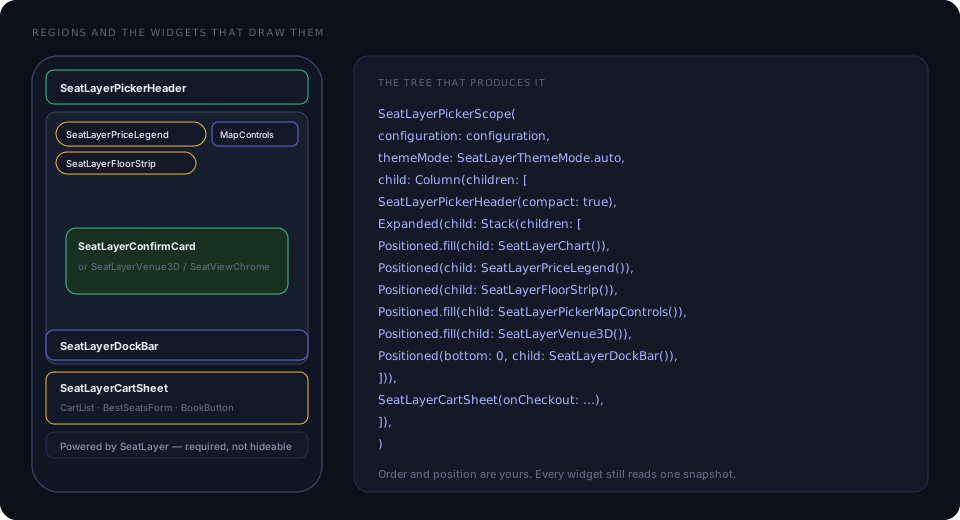
Step 1: place the scope
SeatLayerPickerScope starts the session and publishes the state. Everything
below it can read that state; nothing above it can.
SeatLayerPickerScope(
  configuration: SeatLayerConfiguration(
    event: '<YOUR_EVENT_KEY>',
    publicKey: '<YOUR_PUBLIC_KEY>',
  ),
  themeMode: SeatLayerThemeMode.auto,
  options: const SeatLayerPickerOptions(),
  child: MyPickerLayout(),
)
Pass a controller: when your own code needs to drive the picker; the scope
creates and disposes one otherwise. A controller you create is yours to
dispose(), and you should await controller.close() before deliberately
removing an inline picker, so a picker-owned hold is acknowledged as released.
Step 2: arrange the widgets
class MyPickerLayout extends StatefulWidget {
  const MyPickerLayout({super.key});

  @override
  State<MyPickerLayout> createState() => _MyPickerLayoutState();
}

class _MyPickerLayoutState extends State<MyPickerLayout> {
  bool expanded = false;

  @override
  Widget build(BuildContext context) {
    return Column(
      children: [
        SeatLayerPickerHeader(compact: true, onClose: () => Navigator.pop(context)),
        Expanded(
          child: Stack(
            children: [
              const Positioned.fill(child: SeatLayerChart()),
              const Positioned(
                top: 8,
                left: 0,
                child: SeatLayerPriceLegend(compact: true),
              ),
              const Positioned(top: 40, left: 0, child: SeatLayerFloorStrip()),
              const Positioned.fill(
                child: SeatLayerPickerMapControls(compact: true),
              ),
              const Positioned.fill(child: SeatLayerVenue3D()),
              const Positioned(left: 0, right: 0, bottom: 0, child: SeatLayerDockBar()),
            ],
          ),
        ),
        SeatLayerCartSheet(
          expanded: expanded,
          onExpandedChanged: (value) => setState(() => expanded = value),
          onCheckout: (handoff) => bookOnYourBackend(handoff.holdId),
        ),
        const SeatLayerPickerAttribution(),
      ],
    );
  }
}
SeatLayerChart needs bounded space and owns pan and pinch. Give it an
Expanded, a SizedBox with a definite height, or a full-screen route, never
a competing gesture-driven scroll view.
Step 3: read state in your own widgets
The scope exposes static lookups rather than a single of. Each one subscribes
your widget to exactly what it asked for.
| Lookup | Returns |
|---|---|
SeatLayerPickerScope.stateOf(context) |
SeatLayerPickerState, the current read-only picker state |
SeatLayerPickerScope.controllerOf(context) |
SeatLayerPickerController |
SeatLayerPickerScope.configurationOf(context) |
SeatLayerConfiguration |
SeatLayerPickerScope.optionsOf(context) |
SeatLayerPickerOptions |
SeatLayerPickerScope.themeOf(context) |
SeatLayerPickerThemeData? |
SeatLayerPickerScope.themeModeOf(context) |
SeatLayerThemeMode |
SeatLayerPickerScope.brightnessOf(context) |
Brightness, the resolved side |
SeatLayerPickerScope.stringsOf(context) |
SeatLayerPickerStrings |
SeatLayerPickerScope.callbacksOf(context) |
SeatLayerPickerCallbacks |
SeatLayerPickerScope.cartSheetExpandedOf(context) |
bool |
A custom section list, in full:
class MySectionList extends StatelessWidget {
  const MySectionList({super.key});

  @override
  Widget build(BuildContext context) {
    final state = SeatLayerPickerScope.stateOf(context);
    final picker = SeatLayerPickerScope.controllerOf(context);
    final strings = SeatLayerPickerScope.stringsOf(context);

    return ListView(
      children: [
        for (final section in state.snapshot?.sections ?? const [])
          ListTile(
            title: Text(section.displayLabel ?? section.label),
            subtitle: section.seatsLeft == null
                ? null
                : Text(strings.seatsLeft(section.seatsLeft!)),
            selected: section.id == state.snapshot?.map.focusedSectionId,
            onTap: () => picker.focusSection(section.id),
          ),
        TextButton(
          onPressed: picker.overview,
          child: Text(strings.overview),
        ),
      ],
    );
  }
}
SeatLayerPickerController is a ValueNotifier, so a
ValueListenableBuilder<SeatLayerPickerState> works too when you hold the
controller directly.
Step 4: drive the picker
The commands a custom layout reaches for most:
| You want | Call |
|---|---|
| Focus a section | picker.focusSection(sectionId) |
| Go back to the venue | picker.overview() |
| Move to a floor | picker.setFloor(floorId) · picker.showAllFloors() |
| Select or drop seats | picker.selectObjects([...]) · picker.deselectObjects([...]) |
| Select a whole category | picker.selectCategories([...]) · picker.deselectCategories([...]) |
| Remove one ticket | picker.removeObject(objectId) |
| Constrain the buyer | picker.setSelectableObjects([...]) · picker.setMaxSelection(4) |
| Filter the map | picker.setCategoryFilter({'stalls'}, focus: true) |
| Find seats | picker.bestAvailable(quantity: 4, categoryKey: 'stalls') |
| Switch view | picker.setBuyerView(SeatLayerBuyerView.venue3D) for 3D. picker.setViewMode(mode) accepts only flat; older values show the flat map |
| Inspect one seat | picker.showSeatIn3D(seat) · picker.openSeatView(seat) |
| Restore a hold | picker.resumeHold(holdId) · picker.extendHold() |
| Take the handoff | await picker.checkout() |
Every method returns a Future, and inventory-changing calls are serialised, so
a double tap cannot produce two holds.
Step 5: tell the map where your chrome is
The SDK frames a focused section, the venue overview, and a best-available result into the part of the map the buyer can actually see. Report what your chrome covers, or those framings will centre behind it:
SeatLayerPickerScope.setViewportInsets(
  context,
  const SeatLayerViewportInsets(top: 96, bottom: 140),
);
SeatLayerViewportInsets has top, right, bottom, and left, all
defaulting to 0, plus SeatLayerViewportInsets.zero. It is a framing inset,
not a clip. The venue still draws and pans underneath. The applied value comes
back as viewportInsets inside the public state’s map field.
SeatLayerPickerController.setViewportInsets is the same call when you hold the
controller.
Step 6: lock the map behind your own prompt
Whenever your own chrome covers the map, disable map interaction for exactly as
long as it is up, and restore it in a finally:
await picker.setMapInteractionEnabled(false);
try {
  await showMyNativeSeatPrompt();
} finally {
  await picker.setMapInteractionEnabled(true);
}
This makes the map itself inert. Keep a Flutter IgnorePointer over your
chrome as well, because the map surface can still be hit-tested beneath
composited Flutter widgets, so the tap that opened your prompt cannot select a
seat underneath it.
Do not wrap the map in an app-level drag or scale recogniser, and do not forward raw touch coordinates to it. Both compete with the map and break its tap-versus-pan suppression.
Step 7: own the back ladder
The drop-in ships a PopScope that collapses the sheet, then dismisses the
confirm card, then returns to the overview, before letting your route pop. A
custom layout owns that ladder itself:
PopScope(
  canPop: false,
  onPopInvokedWithResult: (didPop, _) async {
    if (didPop) return;
    final map = SeatLayerPickerScope.stateOf(context).snapshot?.map;
    if (expanded) {
      setState(() => expanded = false);
    } else if (map?.focusedSectionId != null) {
      await picker.overview();
    } else {
      if (context.mounted) Navigator.of(context).pop();
    }
  },
  child: MyPickerLayout(),
)
Step 8: close cleanly
Before removing an inline picker you control, await close() so a picker-owned
hold is acknowledged as released, then dispose a controller you created:
await picker.close();
picker.dispose();
A hold already handed to your app through onCheckout is not released,
because ownership moved with the handoff. Process termination cannot guarantee a
release, so the server-side TTL remains the final safety boundary.